Names and descriptions
Label each space in language your members actually use, with short descriptions that explain who the area is for and what happens there.
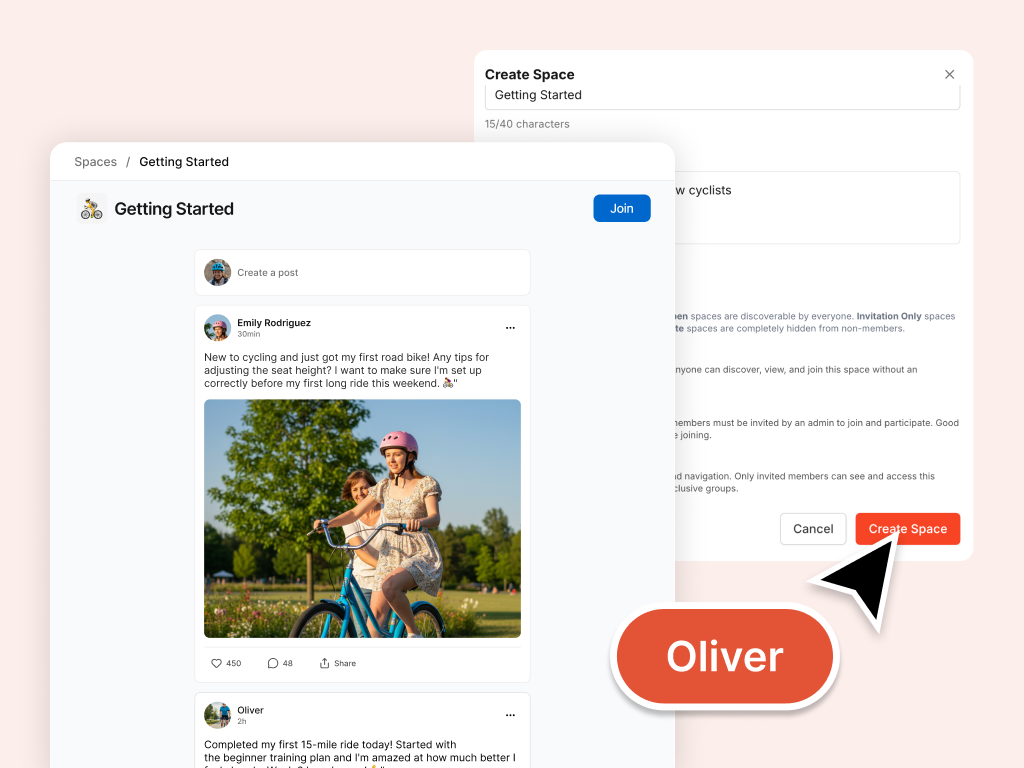
A community without structure feels scattered. Oliver helps you design member spaces with names, descriptions, visibility, icons, and featured placement so conversations have a natural home. You preview every change as a draft before it goes live.
Label each space in language your members actually use, with short descriptions that explain who the area is for and what happens there.
Set which spaces are open, invitation-only, or private so the right people see the right areas without exposing sensitive conversations.
Propose emoji or Lucide icon names from the Spaces picker so members can spot each area at a glance.
Highlight your most important spaces so new members know where to start instead of scrolling an undifferentiated list.
Organise spaces around programs, topics, or member tiers so your community layout feels intentional, not accidental.
Review every name, icon, and visibility change as a draft first. Your live community stays untouched until you approve it.
Plan spaces that fit the audiences and programs your signup forms and landing page describe.
Refine your layout as cohorts launch or audiences grow, without disrupting the conversations members already rely on.
Ask in plain language, review drafts in Preview, and apply when you are ready.
Tell Oliver who your members are and how you want them to gather. He turns that into space names, descriptions, and structure you can react to.
See names, icons, visibility, and featured placement as a proposal. Nothing goes live until you have checked it in Preview.
Publish the spaces that work and refine the rest. You choose what members see in your live community.
Your signup forms, landing page, and space layout stay aligned, so the path from join to first conversation feels intentional.
Hand off real tasks in everyday language. Oliver turns them into drafts you review in Preview before anything goes live.
Suggest spaces for a DTC brand community: product talk, style tips, and customer support.
We need separate areas for volunteers and donors. How should we structure visibility?
Review our current spaces and recommend a cleaner layout for new members.
We are launching a founding-member cohort. Which spaces should be featured on day one?
Oliver is one member of your AI team. Colleagues share organizational context as you build, so your brand, pages, signup flow, and community stay connected.
A launch-ready brand members trust: name, colours, and assets you upload and approve in Preview.
A joining experience that sets the right expectations: intake questions, form copy, and flows you preview before publish.
Challenges, badges, and points members can work toward. Preview before apply.
A public page that turns visitors into members: headlines, sections, proof, and CTAs you preview before publish.
Sign up for Coralbeat Community and collaborate with Oliver. No credit card required.
Work with Oliver